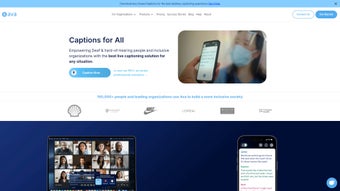

Download Ava – AI‑Powered Live Captioning Tool for Accessibility
Ava is an innovative AI‑driven captioning platform that delivers real‑time subtitles and transcriptions for meetings, webinars, and in‑person conversations. Built with the Deaf and hard‑of‑hearing community in mind, Ava works as a web‑based application that integrates seamlessly with popular video‑conferencing services such as Zoom and Google Meet, as well as with physical event setups. By blending cutting‑edge speech‑recognition models with a network of professional captioners, Ava guarantees accurate, ADA‑compliant captions that can be saved, summarized, and shared instantly. Whether you’re a teacher, healthcare provider, remote‑team manager, or event organizer, Ava empowers you to create inclusive communication experiences without the need for bulky hardware or complex installations.
Key Features that Set Ava Apart
- Live AI Captioning: Real‑time subtitles generated from speech, displayed within seconds for maximum comprehension.
- Hybrid AI + Human Accuracy: Ava combines machine learning with on‑demand professional captioners to boost precision, especially in noisy environments.
- Cross‑Platform Integration: Direct plugins for Zoom, Google Meet, Microsoft Teams, and the ability to overlay captions on any web‑based video feed.
- Ava Scribe: A premium add‑on that delivers high‑quality, post‑meeting transcripts ready for export to PDF, DOCX, or plain text.
- Ava Connect: Seamless API‑driven integration for custom workflows, allowing developers to embed caption streams into proprietary apps.
- Automatic Summaries: AI‑generated meeting highlights and action‑item lists that can be emailed or stored in cloud drives.
- Secure Cloud Storage: End‑to‑end encryption for saved transcripts, ensuring compliance with HIPAA, FERPA, and other privacy regulations.
- 24/7 Availability: Cloud‑hosted service guarantees captioning support around the clock, ideal for international teams.
- ADA‑Compliant Design: Meets WCAG 2.1 AA standards, providing adjustable font sizes, color contrast, and positioning options.
Installation & Usage – Getting Started in Minutes
Ava is a web‑based solution, which means there’s no bulky software to download or install on a local machine. Follow these three simple steps to start captioning your next meeting:
- Create an Account: Visit ava.me and sign up using an email address or single‑sign‑on (SSO) via Google or Microsoft. After email verification, you’ll be directed to the dashboard.
- Connect Your Conferencing Tool: In the dashboard, click “Integrations” and select the platform you use (Zoom, Google Meet, Teams, etc.). Follow the on‑screen OAuth flow to grant Ava permission to join meetings as a hidden participant. For in‑person events, simply launch the Ava web app on a laptop and connect a high‑quality USB microphone.
- Start Captioning: Once connected, Ava automatically detects speech and begins streaming captions to the designated window. You can adjust font size, background opacity, and positioning through the “Settings” pane. After the session, click “Save Transcript” to download a .txt or .pdf file, or enable “Auto‑Summary” to receive a concise meeting recap via email.
For power users, Ava offers a RESTful API documented at developer.ava.me. This API lets you embed caption streams into custom web apps, LMS platforms, or even smart‑room hardware. The API follows standard OAuth 2.0 authentication and returns captions in WebVTT or JSON format, making it easy to sync with existing accessibility workflows.
Compatibility, Pros & Cons, and Real‑World Performance
Because Ava runs entirely in the browser, it is compatible with any modern operating system that supports Chrome, Edge, Firefox, or Safari. This includes Windows 10/11, macOS Monterey and later, Linux distributions with recent browsers, as well as mobile browsers on Android 9+ and iOS 13+. For in‑person events, a laptop or tablet with a reliable internet connection and a quality microphone is sufficient.
Pros
- Instant, high‑accuracy captions without the need for local installation.
- Hybrid AI + human workflow reduces errors common in pure‑AI solutions.
- Seamless integration with the most widely used video‑conferencing platforms.
- Secure, encrypted storage that complies with major privacy regulations.
- Scalable pricing model – free tier for basic use, paid plans for enterprises.
- 24/7 availability supports global teams across time zones.
Cons
- No native multi‑language support yet; captions are currently English‑only.
- Reliance on a good quality microphone; poor audio can degrade accuracy.
- Advanced features like Ava Scribe and Ava Connect require separate subscription.
- Web‑only interface may be limiting for users who prefer desktop‑native apps.
- Occasional latency spikes in low‑bandwidth environments.
Overall, Ava delivers a compelling blend of AI efficiency and human reliability that makes live captioning accessible to a broad audience. While the lack of multi‑language support is a notable gap, the platform’s security, ease of use, and integration capabilities position it as a leading tool for inclusive communication in education, healthcare, and remote work.
Frequently Asked Questions (FAQ)
Is Ava free to use?
Ava offers a free tier that includes live captioning for up to 60 minutes per month. Paid plans start at $12 per user per month and unlock unlimited caption minutes, Ava Scribe transcripts, and priority support.
Can Ava caption languages other than English?
As of the latest release, Ava’s AI models support only English. The development team has announced plans to add Spanish, French, and Mandarin in the next 12 months.
Do I need a special microphone for accurate captions?
A high‑quality USB or XLR microphone with noise‑cancellation capabilities greatly improves accuracy, especially in noisy rooms. Built‑in laptop microphones work, but results may vary.
How does Ava ensure privacy and security of saved transcripts?
All data is encrypted in transit (TLS 1.3) and at rest (AES‑256). Ava complies with HIPAA, FERPA, and GDPR, offering role‑based access controls and audit logs for enterprise users.
Can Ava be embedded into my own application?
Yes. Ava Connect provides a RESTful API and WebSocket streams that let developers embed live captioning directly into custom platforms, LMSs, or event‑management software.
Conclusion – Why Ava Is the Captioning Solution You’ve Been Waiting For
In a world where inclusive communication is no longer optional, Ava stands out as a reliable, secure, and user‑friendly captioning platform. Its hybrid AI‑human architecture delivers near‑perfect accuracy, while the web‑based delivery removes installation hurdles and ensures cross‑device compatibility. Whether you’re hosting a virtual classroom, conducting a telehealth session, or running a multinational conference call, Ava equips you with the tools to make every word accessible.
Ready to experience real‑time, ADA‑compliant captions? Create your free account today and transform the way you communicate. For teams that need extended minutes, advanced transcripts, or API access, explore the pricing plans and discover how Ava can fit into your accessibility strategy.



.png)



